China Top Dell PowerEdge R760xa GPU Server Supplier?
Choosing a China-based supplier for a Dell PowerEdge R760xa GPU Server takes more than comparing quotations. Buyers should verify the chassis configuration, GPU support, processor options, memory, storage, power supplies, and network adapters against current Dell documentation. Details matter. A system for model training may need a different balance of accelerators, memory, and cooling than one for rendering or inference.
A reliable supplier should provide a clear bill of materials, identifiable product details, warranty terms, lead-time estimates, and direct answers about configuration limits. Ask whether the unit is new, refurbished, or assembled from mixed stock; this can affect support and lifecycle planning. Request photos of the actual system labels and packaging when appropriate. Check serial-number and warranty status through authorized channels. Not every listing is equally transparent.
For overseas buyers, service matters as much as hardware. Confirm export packaging, shipping insurance, customs paperwork, remote troubleshooting, and the process for replacing a failed component. Compare responses, not just prices. Specific answers about GPU cooling or power requirements are more useful than broad claims of compatibility. Still, supplier claims deserve independent verification. This guide outlines ways to assess China-based vendors, compare offers, and reduce avoidable sourcing risks. The best choice depends on workload, support expectations, delivery schedule, and total cost—not simply the lowest quote.
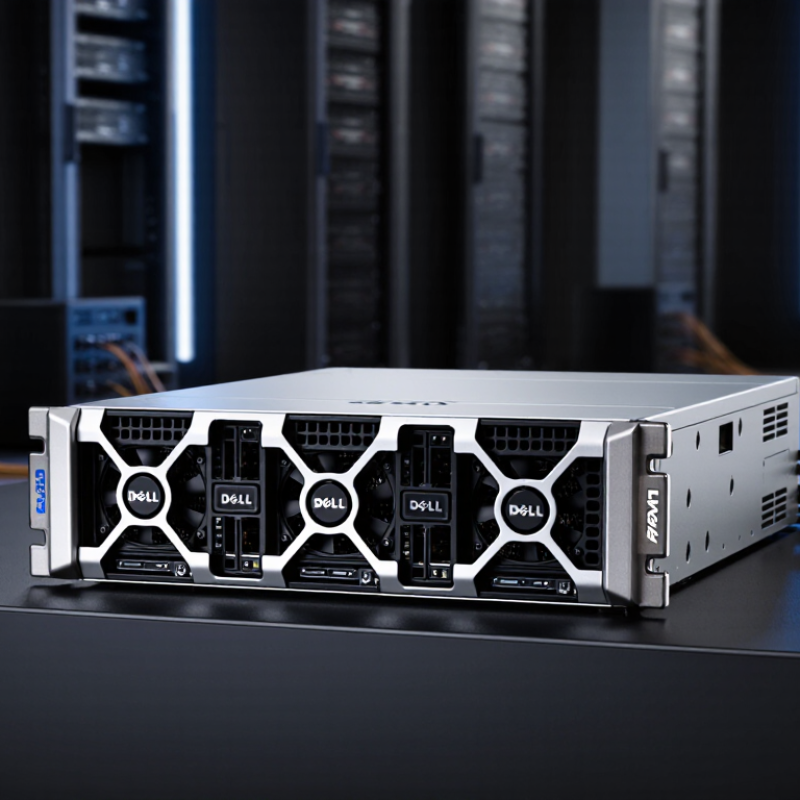
What Is the Dell PowerEdge R760xa GPU Server?
A 2U GPU-optimized rack server is designed for compute-heavy work in a standard data-center rack. It combines dual processor sockets, system memory, PCIe expansion, and configurable storage in one chassis. GPU accelerators handle parallel tasks such as model training, scientific simulation, image processing, and inference. The number and type of supported accelerators depend on the chosen configuration. Cooling and power options matter, too. Small details count.
Compared with a general-purpose server, its internal layout gives accelerator cards more room for power delivery and airflow. Multiple high-power cards can produce substantial heat, so rack ventilation and circuit capacity need careful review. Fast storage can help feed data to processors, but it will not fix every bottleneck. Teams should test representative workloads before settling on a configuration. I would also verify that monitoring tools expose temperatures and power use clearly; this is easy to overlook. A dense system can be capable, yet noisy or inefficient when lightly loaded. The right balance depends on workload, facility limits, and future expansion plans.
GPU Server Supplier Guide — What Is a 2U GPU Server?
| Dimension | Details | What to Check |
|---|---|---|
| Server type | A 2U rack-mount GPU server is a data-center system designed to combine general-purpose processing, memory, storage, and accelerator cards in a chassis approximately 3.5 inches (88.9 mm) tall. | Confirm rack depth, rail compatibility, rack weight capacity, and available airflow. |
| GPU capacity | Some systems in this class support up to four double-width GPUs. Supported card dimensions, power limits, and total accelerator capacity depend on the specific configuration. | Request written confirmation of supported card models, slot layout, power cables, cooling requirements, and firmware compatibility. |
| Processors | Dual-socket configurations are common in this class. The supported processor generation and maximum core count vary by system configuration. | Check processor compatibility, workload licensing implications, and whether both processor sockets are populated. |
| Memory | GPU servers use system memory alongside accelerator memory. Capacity, memory speed, and available expansion slots depend on the processor and installed memory modules. | Ask for the installed memory layout, supported maximum capacity, and available slots for future expansion. |
| Storage | Depending on the chassis configuration, storage may include solid-state drives, hard drives, or NVMe drives. Drive-bay count and interface support are configuration-specific. | Verify usable drive bays, boot-drive arrangement, RAID requirements, and whether drive carriers are included. |
| Power and cooling | Multiple high-power accelerators can substantially increase electricity use and heat output. Power-supply capacity and fan configuration should match the installed hardware. | Request the configured power-supply rating, power-cord type, estimated peak draw, and cooling guidance for the intended data center. |
| Connectivity | Network options can include standard Ethernet and higher-speed adapters, depending on the installed network cards and available expansion slots. | Confirm port speed, port count, transceiver requirements, and compatibility with existing network infrastructure. |
| Typical workloads | GPU servers are commonly used for artificial intelligence training and inference, scientific computing, rendering, and other highly parallel workloads. | Match accelerator memory, software support, storage throughput, and network bandwidth to the target workload. |
| Supplier evaluation | A qualified supplier should provide a clear bill of materials, configuration validation, system testing, delivery details, and support terms. | Compare warranty coverage, delivery lead time, testing records, replacement procedures, and configuration-specific documentation. |
| Configuration note | Maximum specifications are not necessarily available together in every build. Options can be limited by chassis, risers, processor selection, power budget, and cooling requirements. | Request a configuration sheet for the exact system being quoted and verify every component before ordering. |